
如何使元素宽度为:100% 减去内边距?
htmlweb developmentfront end technology更新于 2024/6/18 21:32:17
假设我们为输入框设置了 padding: 50px 10px;,并希望其宽度为父 div 宽度的 100%。使用 width: 100%; 不起作用。为了解决这个问题,我们可以将输入框放置在一个 div 中,并使用position:relative和固定高度。这将使元素宽度为 100% 减去内边距。
我们已将位置设置为相对位置,高度设置为固定 −
.container {
   position: relative;
   height: 30px;
}
输入的位置设置为绝对-
content {
   position: absolute;
   left: 0;
   right: 0;
   padding: 3px 10px;
}
示例
让我们看看完整的例子 -
<!DOCTYPE html>
<html>
<head>
   <style>
      .demo {
         border: thin solid orange;
      }
      .container {
         position: relative;
         height: 30px;
      }
      .content {
         position: absolute;
         left: 0;
         right: 0;
         padding: 3px 10px;
      }
   </style>
</head>
<body>
   <h1>Fix</h1>
   <div class="demo">
      Lorem ipsum dolor sit amet, consectetur adipiscing elit.
      <div class="container">
         <input class="content" type="text" />
      </div>
      Nunc auctor efficitur sapien, luctus faucibus mi dictum nec.
   </div>
</body>
</html>
输出
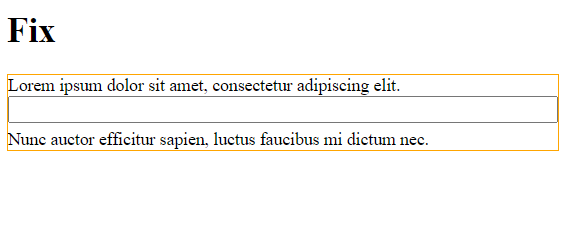
相关文章
有用资源
html 参考教程 - 该教程包含有关 html 的更多信息:https://www.cainiaomax.com/html/

