
HTML 布局
htmlweb developmentfront end technology更新于 2024/5/22 3:56:17
HTML 布局指定了 HTML 网页上组件的排列方式。 HTML 语义元素有很多,它们定义着网页的不同部分。
以下是用于 HTML 布局的语义 HTML 元素:
| 标签 | 说明 |
|---|---|
| header | 它指定了某个部分或文档的标题。 |
| section | 它表示文档中的一个部分。 |
| nav | 它指定了导航链接的容器。 |
| article | 它指定了一个独立的、自包含的文章。 |
| aside | 它指定了除主要内容之外的其他内容的标签(例如 |
| footer | 用于指定部分或文档的页脚。 |
| details | 用于指定附加详细信息的标签。 |
| summary | 用于指定 <details> 元素的页眉。 |
HTML 网页布局使用的技术:
- CSS 浮动属性
- CSS 弹性框
- CSS 框架
- CSS 网格
- HTML 表格
示例
让我们看一个 HTML 布局示例:
<!DOCTYPE html>
<html>
<style>
   * {
      box-sizing: border-box;
   }
   body {
      color: #000;
      background-color: #8BC6EC;
      background-image: linear-gradient(135deg, #8BC6EC 0%, #9599E2 100%);
      text-align: center;
   }
   header {
      background-color: #000;
      padding: 20px;
      text-align: center;
      color: white;
   }
   nav {
      float: left;
      width: 20%;
      height: 200px;
      background: #282828;
      padding: 60px 10px;
   }
   nav ul {
      list-style-type: none;
      padding: 0;
   }
   nav ul li a {
      text-decoration: none;
      color: #fff;
   }
   article {
      float: left;
      padding: 80px 10px;
      width: 80%;
      background-color: #fff;
      height: 200px;
      text-align: center;
   }
   section:after {
      content: "";
      display: table;
      clear: both;
   }
   footer {
      background-color: #000;
      padding: 20px;
      text-align: center;
      color: white;
   }
</style>
<body>
<h1>HTML Layouts Demo</h1>
<header>This is Header</header>
<section>
<nav>
<ul>
<li><a href="#">Home</a></li>
<li><a href="#">About</a></li>
<li><a href="#">Contact</a></li>
</ul>
</nav>
<article>This is an article element.</article>
</section>
<footer>This is Footer</footer>
</body>
</html>
输出
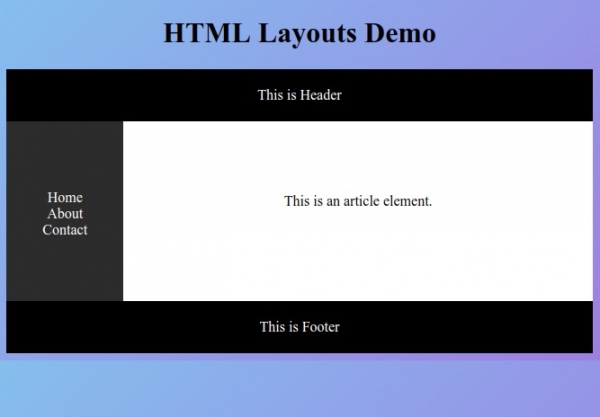
相关文章
有用资源
html 参考教程 - 该教程包含有关 html 的更多信息:https://www.cainiaomax.com/html/

