
HTML DOM 样式 backgroundColor 属性
htmlweb developmentfront end technology更新于 2024/5/20 13:32:17
backgroundColor 属性用于设置或返回元素的背景颜色。我们可以使用标准名称 rgb()、rgba()、hsl() 或 hsla() 来指定值。
语法
以下是语法 −
设置 backgroundColor 属性 −
object.style.backgroundColor = "color|transparent
值
以上属性值的解释如下 −
| Sr.No | 值 &说明 |
|---|---|
| 1 | Color 用于指定背景颜色。 |
| 2 | Transparent 将背景颜色设置为透明,即可以看到底层内容。这是默认值。 |
示例
让我们看一下 backgroundColor 属性的示例 −
<!DOCTYPE html>
<html>
<head>
<style>
   #DIV1{
      background-color: rgba(10,122,102,0.1);
   }
</style>
<script>
   function changeBackColor(){
      document.getElementById("DIV1").style.backgroundColor="rgba(1,200,55,0.5)";
      document.getElementById("Sample").innerHTML="The background color is now changed";
   }
</script>
</head>
<body>
<div id="DIV1">Duis tincidunt urna a interdum consectetur. Pellentesque nec pretium ante.
In nisl magna, vestibulum non vulputate vel, feugiat ac tellus. Sed tincidunt id leo at mollis.
Praesent pellentesque purus vitae scelerisque gravida. Pellentesque pulvinar scelerisque sem,
at euismod sapien tristique et.</div>
<p>Change the above div background color by clicking the below button</p>
<button onclick="changeBackColor()">CHANGE COLOR</button>
<p id="Sample"></p>
</body>
</html>
输出
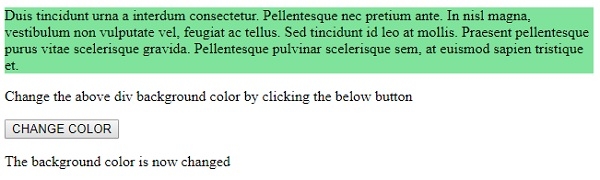
这将产生以下输出 −
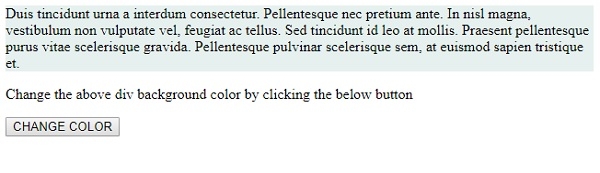
点击"更改剪辑"按钮 −
相关文章
有用资源
html 参考教程 - 该教程包含有关 html 的更多信息:https://www.cainiaomax.com/html/

