
HTML DOM Dialog 对象
htmlweb developmentfront end technology更新于 2024/6/1 16:44:17
HTML DOM Dialog 对象与 HTML5 <dialog> 元素关联。它用于在网页上创建弹出窗口、模态框等。要查看对话框并允许用户与其交互,应设置 open 属性值。
属性
以下是 Dialog 对象的属性 −
| 属性 | 描述 |
|---|---|
| open | 设置或返回是否应打开对话框。 |
| returnValue | 设置或返回对话框的返回值。 |
方法
以下是 Dialog 对象的方法 −
| 方法 | 描述 |
|---|---|
| close() | 关闭对话框。 |
| show() | 显示对话框。 |
| showModal() | 使对话框位于最顶部并显示 |
语法
以下是语法 −
创建对话框对象 −
var p = document.createElement("DIALOG");
示例
让我们看一个 HTML DOM 对话框对象的示例 −
<!DOCTYPE html>
<html>
<head>
<title>DIALOG OBJECT</title>
<style>
   dialog{
      border:2px solid blue;
      font-weight:bold;
   }
</style>
</head>
<body>
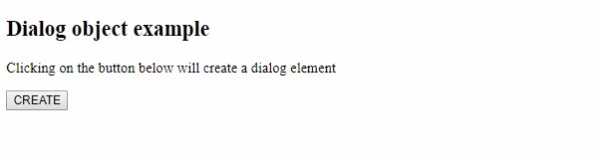
<p> Clicking on the button below will create a dialog element</p>
<button onclick="createDialog()">CREATE</button>
<script>
   function createDialog() {
      var dlg = document.createElement("DIALOG");
      var dlgTxt = document.createTextNode("DIALOG WINDOW with a button");
      var bl=document.createElement("BR");
      var btn = document.createElement("BUTTON");
      var btnText=document.createTextNode("CLICK HERE");
      dlg.setAttribute("open", "open");
      dlg.appendChild(dlgTxt);
      dlg.appendChild(bl);
      btn.appendChild(btnText);
      dlg.appendChild(btn);
      document.body.appendChild(dlg);
   }
</script>
</body>
</html>
输出
这将产生以下输出 −
点击"创建"按钮 −
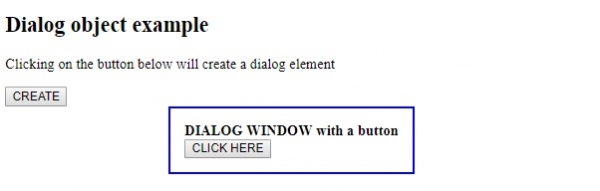
在上面的例子中 −
我们首先创建了一个 CREATE 按钮,当用户点击该按钮时,它将执行 createDialog() 函数 −
<button onclick="createDialog()>CREATE</button>
createDialog() 函数使用 createElement() 方法创建 <dialog> 元素。然后使用 createTextNode() 方法向其中添加一些文本。之后,我们使用 createElement() 方法在 <dialog> 元素内创建一个按钮,并使用 createTextNode() 方法添加按钮文本。
使用 setAttribute() 方法设置要显示给用户的对话框的 open 属性值。最后,使用 document.body appendChild() 方法将对话框及其内部的按钮附加到文档主体,并将 <dialog> 和 <button> 元素作为参数传递 −
function createDialog() {
   var dlg = document.createElement("DIALOG");
   var dlgTxt = document.createTextNode("DIALOG WINDOW with a button");
   var bl=document.createElement("BR");
   var btn = document.createElement("BUTTON");
   var btnText=document.createTextNode("CLICK HERE");
   dlg.setAttribute("open", "open");
   dlg.appendChild(dlgTxt);
   dlg.appendChild(bl);
   btn.appendChild(btnText);
   dlg.appendChild(btn);
   document.body.appendChild(dlg);
}
相关文章
有用资源
html 参考教程 - 该教程包含有关 html 的更多信息:https://www.cainiaomax.com/html/

