
如何在 HTML 中创建图片中的可点击区域?
htmlweb developmentfront end technology更新于 2024/2/5 2:52:17
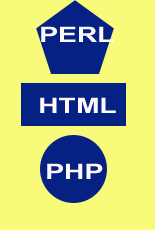
要在图片中创建可点击区域,请创建包含可点击区域的图片地图。例如,点击一个方框会打开不同的网站,点击同一图片中的三角形也会打开不同的网站。
<area> 标签定义图片内部的区域,并嵌套在 <map> 标签中。以下是其属性:
| Sr.No | Attribute &描述 |
|---|---|
| 1 | alt |
| 2 | coords |
| 3 | download |
| 4 | shape |
| 5 | target |
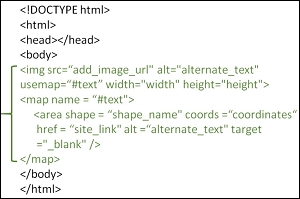
示例
您可以尝试运行以下代码,在 HTML 图像中创建可点击区域
<!DOCTYPE html>
<html>
   <head>
      <title>HTML area Tag</title>
   </head>

   <body>
      <img src = /images/usemap.gif alt = "usemap" usemap = "#lessons"/>
      <map name = "lessons">
         <area shape = "poly" coords = "74,0,113,29,98,72,52,72,38,27"
            href = "/perl/index.htm" alt = "Perl Tutorial" target = "_blank" />
         <area shape = "rect" coords = "22,83,126,125" alt = "HTML Tutorial"
            href = "/html/index.htm" target = "_blank" />
         <area shape = "circle" coords = "73,168,32" alt = "PHP Tutorial"
            href = "/php/index.htm" target = "_blank" />
      </map>
   </body>
</html>
输出
相关文章
有用资源
html 参考教程 - 该教程包含有关 html 的更多信息:https://www.cainiaomax.com/html/

