
如何使 div 不大于其内容?
htmlweb developmentfront end technology更新于 2024/6/18 20:28:17
要使 div 不大于其内容,请使用值为 inline-block 的 display 属性。此处有一个包含图片的 div -
<div class="wrapper">
   <img src="https://www.cainiaomax.com/python3/images/python-mini-logo.jpg"
   width="300" alt="Python">
</div>
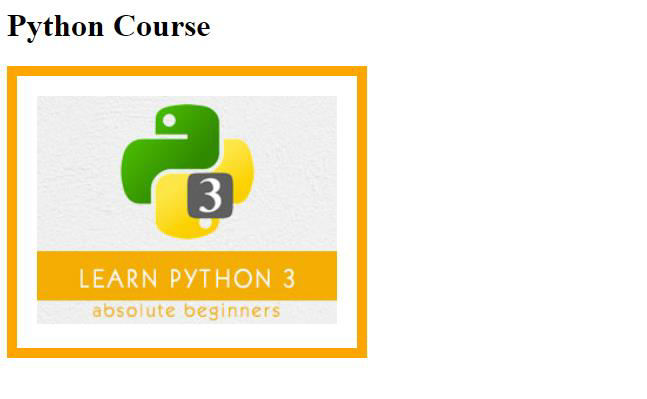
该 div 使用 inline-block 样式。此 inline-block 将形成一个不大于其内容的 div -
.wrapper{
    display: inline-block;
    border: 10px solid orange;
}
图片带有边框 -
img{
    border: 20px solid white;
}
示例
现在让我们看完整的示例 -
<!DOCTYPE html>
<html lang="en">
<head>
   <title>Example</title>
   <style>
      .wrapper{
         display: inline-block;
         border: 10px solid orange;
      }
      img{
         border: 20px solid white;
      }
   </style>
</head>
<body>
   <h1>Python Course</h1>
   <div class="wrapper">
      <img src="https://www.cainiaomax.com/python3/images/python-mini-logo.jpg"
      width="300" alt="Python">
   </div>
</body>
</html>
输出
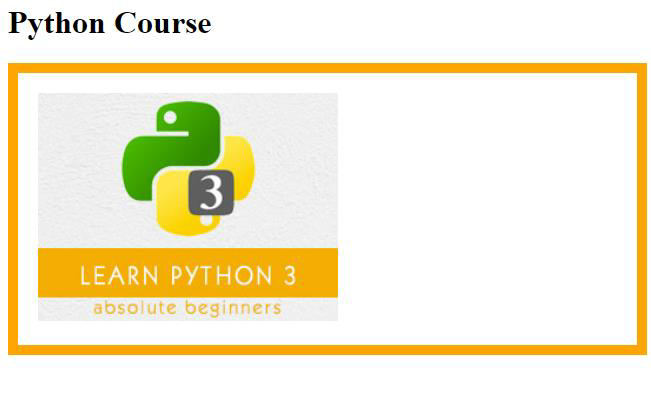
如果我们不添加上面的显示内联块,则以下内容将可见,即 div 大于内容 -
相关文章
有用资源
html 参考教程 - 该教程包含有关 html 的更多信息:https://www.cainiaomax.com/html/

