
使用 Python 代码执行 Google 搜索?
pythonserver side programmingprogramming更新于 2025/5/12 23:08:17
在本文中,我们将尝试使用 Python 代码进行 Google 搜索,如果您正在开发 Python 项目,并且需要从网络访问一些数据,并且搜索结果(来自网络)将在您的项目中使用,这将非常方便。
先决条件 –
- 您必须在系统上安装 Python。
- 安装 Google 模块。您可以使用 pip 安装 google 模块,如下所示 −
C:\Users\rajesh>python -m pip install google
正在收集 google
正在下载 https://files.pythonhosted.org/packages/c8/b1/887e715b39ea7d413a06565713c5ea0e3132156bd6fc2d8b165cee3e559c/google-2.0.1.tar.gz
已满足要求:c:\python\python361\lib\site-packages 中的 beautifulsoup4(来自 google)(4.6.0)
正在安装收集的软件包:google
正在运行 setup.py install for google ... 完成
已成功安装 google-2.0.1
如果以上所有先决条件完成后,您可以编写代码使用 Python 进行谷歌搜索。
以下是用户想要搜索特定关键字(例如:"AI in Python"或"Tutorialspoint")的程序,并希望所有链接(假设谷歌搜索的前 10 个结果)用于他的 Python 项目。
# 使用 Python 代码执行谷歌搜索
class Gsearch_python:
   def __init__(self,name_search):
      self.name = name_search
   def Gsearch(self):
      count = 0
      try :
         from googlesearch import search
      except ImportError:
         print("No Module named 'google' Found")
      for i in search(query=self.name,tld='co.in',lang='en',num=10,stop=1,pause=2):
         count += 1
         print (count)
         print(i + '\n')
if __name__=='__main__':
   gs = Gsearch_python("Tutorialspoint Python")
   gs.Gsearch()
输出
1
https://www.tutorialspoint.com/python/
2
https://www.tutorialspoint.com/python3/
3
https://www.tutorialspoint.com/python_online_training/index.asp
4
https://www.tutorialspoint.com/python/python_overview.htm
5
https://www.tutorialspoint.com/python/python_loops.htm
6
https://www.tutorialspoint.com/python/python_pdf_version.htm
7
https://www.tutorialspoint.com/python/python_basic_syntax.htm
8
https://www.tutorialspoint.com/tutorialslibrary.htm
9
https://www.tutorialspoint.com/
10
https://www.tutorialspoint.com/django/
11
https://www.tutorialspoint.com/numpy
12
https://www.quora.com/I-have-learned-Python-from-Tutorials-Point-What-should-I-do-to-learn-more-topics-so-that-I-can-have-more-advantages-on-my-interviews
13
https://www.pdfdrive.com/python-tutorial-tutorials-point-e10195863.html
当我们尝试通过浏览器搜索时,我们会得到类似的结果 −
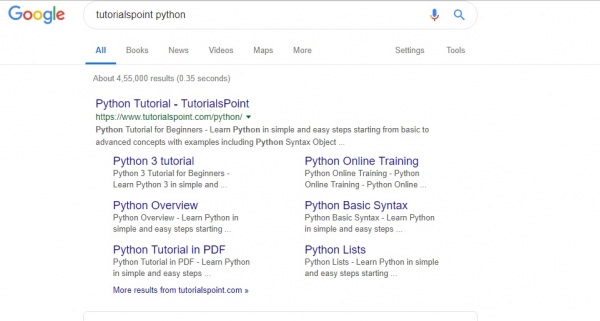
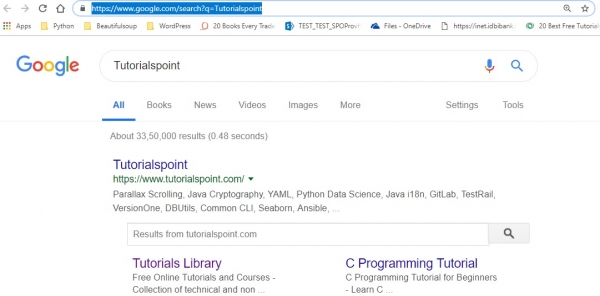
如果我们想直接通过浏览器查询搜索结果,而不是给出结果链接,下面是程序 −
from googlesearch import *
import webbrowser
#to search,将在执行时询问搜索查询
query = input("Input your query:")
#iexplorer_path = r'C:\Program Files (x86)\Internet Explorer\iexplore.exe %s'
chrome_path = r'C:\Program Files (x86)\Google\Chrome\Application\chrome.exe %s'
for url in search(query, tld="co.in", num=1, stop = 1, pause = 2):
webbrowser.open("https://google.com/search?q=%s" % query)
输出
>>>
=============== RESTART: C:/Python/Python361/google_search1.py ===============
Input your query:Tutorialspoint
上面我搜索了一个查询"tutorialspoint",它会弹出一个带有减号的浏览器窗口
相关文章
有用资源
python 参考教程 - 该教程包含有关 python 的更多信息:https://www.cainiaomax.com/python/

