
HTML DOM TouchEvent 对象
htmlweb developmentfront end technology更新于 2024/3/20 21:00:17
HTML DOM TouchEvent 对象表示使用触摸设备与 HTML 文档元素交互时发生的事件。
此处,"TouchEvent" 可以具有以下属性和方法 −
| 属性/方法 | 描述 |
|---|---|
| altKey | 它返回一个布尔值,该布尔值对应于触发触摸事件时 alt 键是否被按下的状态。 |
| changedTouches | 它返回对应于触摸事件状态改变时触发的所有接触点列表的 TouchList 对象 |
| ctrlKey | 如果在触发 touchevent 时按下了 ctrl,则返回与状态对应的布尔值 |
| metaKey | 如果在触发 touchevent 时按下了 meta,则返回与状态对应的布尔值 |
| shiftKey | 如果在触发 touchevent 时按下了 shift,则返回与状态对应的布尔值 |
| targetTouches | 它返回一个 TouchList 对象,该对象对应于触摸表面上触发的所有接触点的列表。如果在指定节点或其任何子节点上触发了触摸,则后续触摸只有在同一节点上也触发时才会计数。 |
| touches | 它返回一个 TouchList 对象,该对象对应于触摸表面上触发的所有接触点的列表。如果在指定节点或其任何子节点上触发了触摸,则后续触摸即使不在同一节点上触发也将被计数。 |
注意:我们在移动设备或具有触摸访问权限的系统上访问的在线 HTML 编辑器上运行了触摸事件示例。这样做是为了让我们能够执行触摸操作,例如触摸屏幕 2 秒。
让我们看一个 TouchEvent ctrlKey 属性的示例 −
示例
<!DOCTYPE html>
<html>
<head>
<title>HTML DOM TouchEvent ctrlKey</title>
<style>
   form {
      width:70%;
      margin: 0 auto;
      text-align: center;
   }
   * {
      padding: 2px;
      margin:5px;
   }
   input[type="button"] {
      border-radius: 10px;
   }
   legend{
      border-color: #dc3545;
   }
   span {
      display: inline-block;
      width: 40px;
      height: 20px;
      margin: 1px;
      color: #fff;
      border: 3px solid black;
   }
   div span:nth-child(1){
      background-color: #FF8A00;
   }
   div span:nth-child(2){
      background-color: #F44336;
   }
   div span:nth-child(3){
      background-color: #03A9F4;
   }
   div span:nth-child(4){
      background-color: #4CAF50;
   }
</style>
</head>
<body>
   <form id="formSelect" ontouchstart="eventAction(event)">
      <fieldset>
         <legend>HTML-DOM-TouchEvent-ctrlKey</legend>
         <label for="textSelect">Background Color Changer</label>
         <div><span>alt</span><span>Ctrl</span><span>Meta</span><span>Shift</span></div>
         <div id="divDisplay">No HotKey Pressed</div>
      </fieldset>
   </form>
<script>
   var divDisplay = document.getElementById("divDisplay");
   var formSelect = document.getElementById("formSelect");
   function eventAction(event) {
      if(event.ctrlKey){
         formSelect.style.backgroundColor = '#F44336';
         formSelect.style.color = '#FFF'
         divDisplay.textContent = 'ctrl Key Pressed';
      }
   }
</script>
</body>
</html>
输出
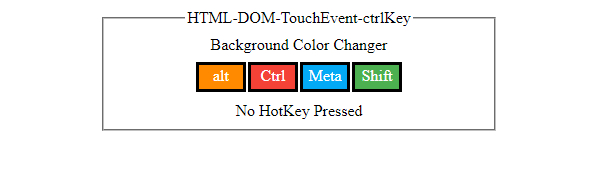
触发触摸事件之前 −
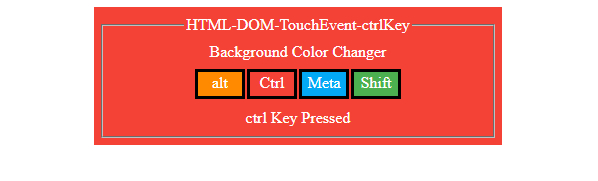
按下 alt 键触发触摸事件之后 −
此外,"TouchEvent"可以有以下事件类型 −
| 事件 | 描述 |
|---|---|
| ontouchcancel | 当一个或多个触摸事件被中断时,会触发 touchcancel 事件 |
| ontouchend | 当触摸从触摸屏上移开时,会触发 touchend 事件 |
| ontouchmove | 当触摸在触摸屏上移动时,会触发 touchmove 事件 |
| ontouchstart | 当触摸屏被触摸时,会触发touchstart事件 |
让我们看一个ontouchend event属性的示例 −
示例
<!DOCTYPE html>
<html>
<head>
<title>HTML DOM touchend event</title>
<style>
   form {
      width:70%;
      margin: 0 auto;
      text-align: center;
   }
   * {
      padding: 2px;
      margin:5px;
   }
   input[type="button"] {
      border-radius: 50%;
      font-size: 20px;
      padding: 20px;
      border: 5px solid rgb(220, 53, 69);
      background: rgba(220, 53, 69, 0.5);
      color: #fefefe;
   }
</style></head>
<body>
   <form>
      <fieldset>
         <legend>HTML-DOM-touchend-event</legend>
         <label for="textSelect">Game Time</label>
         <input type="button" id="gameSelect" value="Hold On">
         <div id="divDisplay">Hold On for 1 - sec to Win</div>
      </fieldset>
   </form>
<script>
   var divDisplay = document.getElementById("divDisplay");
   var gameSelect = document.getElementById("gameSelect");
   var duration = 1000;
   var timer;
   gameSelect.ontouchstart = startEventAction;
   function startEventAction() {
      timer = setTimeout(victory, duration);
   }
   gameSelect.ontouchend = endEventAction;
   function endEventAction(){
      if(timer)
         clearTimeout(timer);
   }
   function victory(){
      divDisplay.textContent = "You Win"
   }
</script>
</body>
</html>
输出
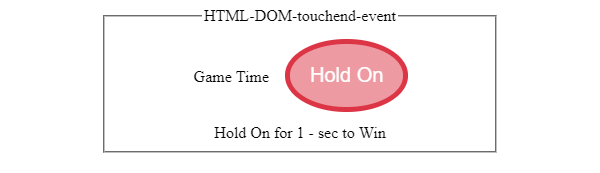
触摸"按住"按钮之前 −
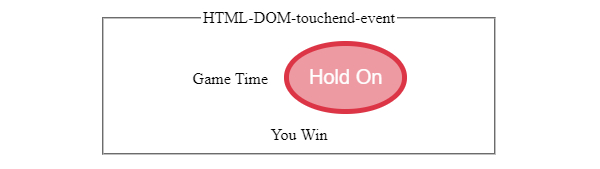
触摸屏幕上的"按住"按钮后 −
相关文章
有用资源
html 参考教程 - 该教程包含有关 html 的更多信息:https://www.cainiaomax.com/html/

