
HTML DOM Style listStyleImage 属性
htmlweb developmentfront end technology更新于 2024/3/17 0:12:17
HTML DOM Style listStyleImage 属性用于设置或返回图像作为列表项标记。
以下是语法 −
设置 listStyleImage 属性 −
object.style.listStyleImage = "none|url|initial|inherit"
以上属性解释如下 −
| 值 | 描述 |
|---|---|
| none | 这是默认值,不显示任何图像。 |
| url | 用于指定图像路径。 |
| initial | 用于将此属性设置为初始值。 |
| inherit | 继承父级属性值 |
我们来看一个 listStyleImage 属性的示例 −
示例
<!DOCTYPE html>
<html>
<head>
<script>
   function changeListImage() {
      document.getElementById("LIST1").style.listStyleImage =          "url('https://upload.wikimedia.org/wikipedia/commons/thumb/0/05/Red_circle.svg/10px-   Red_circle.svg.png')";
   document.getElementById("Sample").innerHTML=" The list marker has been replaced by a red circle    image";
   }
</script>
</head>
<body>
   <ul id="LIST1">
      <li>LIST ITEM1</li>
      <li>LIST ITEM2</li>
      <li>LIST ITEM3</li>
      <li>LIST ITEM4</li>
   </ul>
   <p>Click the below button to set the list style image for the above list</p>
   <button type="button" onclick="changeListImage()">Change List Image</button>
   <p id="Sample"></p>
</body>
</html>
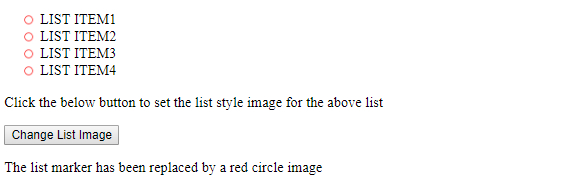
输出

点击"更改列表图像"按钮 −
相关文章
有用资源
html 参考教程 - 该教程包含有关 html 的更多信息:https://www.cainiaomax.com/html/

