
HTML DOM 样式的 display 属性
htmlweb developmentfront end technology更新于 2024/3/14 5:32:17
HTML DOM 样式的 display 属性用于设置或返回元素的显示类型。元素大多为块级或内联。您也可以使用 display:none 隐藏元素。
以下是语法 −
设置 display 属性 −
object.style.display = value
上述属性值的解释如下 −
| 值 |
描述 |
|---|---|
| inline |
将元素显示为行内元素,即 width 和 height 属性将不起作用。 |
| block |
块元素显示在新行上并占据整个宽度。 |
| contents |
这仅显示子元素,而父元素消失,使子元素成为 DOM 的直接子元素。 |
| flex |
将元素显示为块级弹性容器 |
| grid |
将元素显示为块级网格容器 |
| inline-block |
与内联相同,但现在可以应用宽度和高度值。 |
| inline-flex |
将元素显示为内联级弹性容器 |
| inline-grid |
将元素显示为内联级网格容器 |
| inline-table |
元素显示为内联级表格 |
| list-item |
让元素表现得像 <li>元素 |
| run-in |
根据上下文,将元素显示为块级或内联元素 |
| table |
使元素表现得像 <table> 元素 |
| table-caption |
使元素表现得像 <caption>元素 |
| table-column-group |
使元素表现得像一个 <colgroup> 元素 |
| table-header-group |
使元素表现得像一个 <thead> 元素 |
| table-footer-group |
使元素表现得像一个 <tfoot> 元素 |
| table-row-group |
让元素表现得像一个 <tbody> 元素 |
| table-cell |
让元素表现得像一个 <td> 元素 |
| table-column |
让元素表现得像一个 <col> 元素 |
| table-row |
让元素表现得像一个 <tr>元素 |
| none |
该元素已完全移除 |
| initial |
将此属性设置为初始值。 |
| inherit |
继承父级属性值 |
我们来看一个 display 属性的示例 −
示例
<!DOCTYPE html>
<html>
<head>
<style>
   #DIV1{
      padding:10px;
      background-color:lightblue;
      display:flex;
      flex-direction:right;
   }
   #flexSpan{
      width:70px;
      background-color:red;
      margin:20px;
      padding:10px;
   }
</style>
<script>
   function changeDisplay() {
      document.getElementById("DIV1").style.display = "block";
      document.getElementById("flexSpan").style.display = "block";
      document.getElementById("Sample").innerHTML="The display is now changed to block for both the    div and its inner Span elements";
   }
</script>
</head>
<body>
   <div id="DIV1">
      <span id="flexSpan">WORLD1</span>
      <span id="flexSpan">WORLD2</span>
   </div>
   <p>Change the display property of the above div and its inner elements by clicking the below    button</p>
   <button onclick="changeDisplay()">Change Display</button>
   <p id="Sample"></p>
</body>
</html>
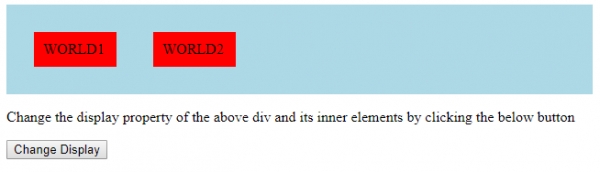
输出
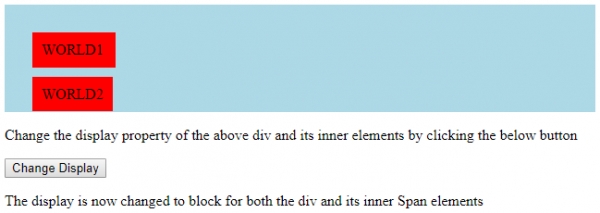
点击“更改显示” −
相关文章
有用资源
html 参考教程 - 该教程包含有关 html 的更多信息:https://www.cainiaomax.com/html/

