
HTML DOM 样式的光标属性
htmlweb developmentfront end technology更新于 2024/3/14 4:28:17
HTML DOM 样式的光标属性用于在显示鼠标指针时设置或获取光标类型。
以下是语法 −
设置光标属性 −
object.style.cursor=value
下表演示了该值
| 值 |
描述 |
|---|---|
| alias |
光标表示要创建某个对象的别名 |
| all-scroll |
光标表示可以向任意方向滚动 |
| auto |
默认。浏览器设置光标 |
| cell |
光标表示可以选择一个单元格(或一组单元格) |
| context-menu |
光标指示上下文菜单可用 |
| col-resize |
光标指示列可以水平调整大小 |
| copy |
光标指示要复制的内容 |
| crosshair |
光标渲染为十字准线 |
| default |
默认光标 |
| e-resize |
光标指示框的某条边向右(东)移动 |
| ew-resize |
指示双向调整大小光标 |
| grab |
光标指示可以抓取某些内容 |
| grabbing |
光标指示可以抓取某些内容 |
| help |
光标指示可获取帮助 |
| move |
光标指示待移动内容 |
| n-resize |
光标指示框的某条边将向上(北)移动 |
| ne-resize |
光标指示框的某条边将向右上方(北/东)移动 |
| nesw-resize |
表示双向调整大小光标 |
| ns-resize |
表示双向调整大小光标 |
| nw-resize |
光标指示框的边缘将向上和向左移动(北/西) |
| nwse-resize |
表示双向调整大小光标 |
| no-drop |
光标指示拖动的项目无法在此处放置 |
| none |
元素未渲染任何游标 |
| not-allowed |
游标指示请求的操作将不会被执行 |
| pointer |
游标是一个指针,指向一个链接 |
| progress |
游标指示程序正忙(正在进行中) |
| row-resize |
光标指示该行可以垂直调整大小 |
| s-resize |
光标指示框的一条边将向下(南)移动 |
| se-resize |
光标指示框的一条边将向下和向右移动(南/东) |
| sw-resize |
光标指示框的一条边将向下和向左移动(南/西) |
| text |
光标指示可选择的文本 |
| URL |
以逗号分隔的自定义光标 URL 列表。注意:请务必在列表末尾指定一个通用光标,以防所有 URL 定义的光标均不可用 |
| vertical-text |
光标指示可选择的垂直文本 |
| w-resize |
光标指示框的某个边缘将向左(西)移动 |
| wait |
光标指示程序正忙 |
| zoom-in |
光标指示某些内容可以放大 |
| zoom-out |
光标指示可缩小内容 |
| initial |
将此属性设置为默认值。 |
| inherit |
从其父元素继承此属性。 |
我们来看一个关于光标属性的示例 −
示例
<!DOCTYPE html>
<html>
<head>
<style>
   #one {
      background-color: beige;
   }
   #two {
      background-color: lavender;
   }
</style>
<script>
   function changeCursor() {
      document.getElementById("one").style.cursor = "cell";
      document.getElementById("two").style.cursor = "grab";
      document.getElementById("Sample").innerHTML="Hover over the first paragraph to see cursor          change to cell and on second to see it change to grab icon";
   }
</script>
</head>
<body>
   <p id="one">This is some sample text inside first paragraph.This is some sample text inside first    paragraph.This is some sample text inside first paragraph.This is some sample text inside first    paragraph.</p>
   <p id="two">This is some sample text inside second paragraph.This is some sample text inside    second paragraph.This is some sample text inside second paragraph.This is some sample text inside    second paragraph.</p>
   <p>Change the cursor property by clicking the below button</p>
   <button onclick="changeCursor()">Change Cursor</button>
   <p id="Sample"></p>
</body>
</html>
输出
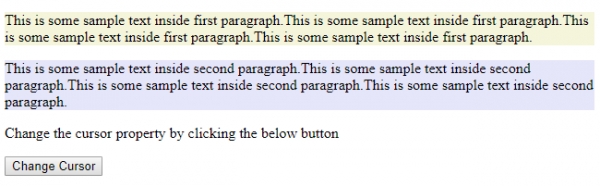
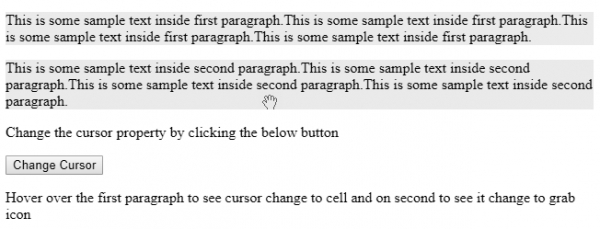
点击"更改光标"按钮后,光标会发生变化,如下图所示 −
相关文章
有用资源
html 参考教程 - 该教程包含有关 html 的更多信息:https://www.cainiaomax.com/html/

