
HTML DOM 样式的 columnRuleStyle 属性
htmlweb developmentfront end technology更新于 2024/3/13 22:36:17
HTML DOM 样式的 columnRuleStyle 属性用于定义或返回列规则的样式。
以下是语法 −
设置 columnRuleStyle 属性 −
object.style.columnRuleStyle = "none|hidden|dotted|dashed|solid|double|groove|ridge|inset|outset|
initial|inherit"
以上属性值的解释如下 −
| 值 | 描述 |
|---|---|
| none | 这是默认值,表示无规则。 |
| hidden | 这与"none"相同,但仍会占用规则空间。它基本上是透明的,但仍然存在。 |
| dotted | 这定义了一个点线规则。 |
| dashed | 这定义了一个虚线规则。 |
| solid | 这定义了一个实线规则。 |
| double | 这定义了一个双重规则。 |
| groove | 这定义了一个 3d 凹槽规则,与脊线相反。 |
| ridge | 这定义了一个 3D 脊线规则,与凹槽相反 |
| insert | 这定义了一个 3D 规则边框,效果看起来像是嵌入的。它会产生与 outset 相反的效果。 |
让我们看一个 columnRuleStyle 属性的示例 −
示例
<!DOCTYPE html>
<html>
<head>
<style>
   #DIV1{
      padding: 5px;
      column-count: 5;
      column-rule-width: 9px;
      column-rule-color: lightblue;
      column-rule-style: solid;
   }
</style>
<script>
   function changeColumnRuleStyle(){
      document.getElementById("DIV1").style.columnRuleStyle="dashed";
      document.getElementById("Sample").innerHTML="The column rule style is now changed.";
   }
</script>
</head>
<body>
   <div id="DIV1">
      <img src="https://www.cainiaomax.com/images/Swift.png"><br/>
      <img src="https://www.cainiaomax.com/images/xamarian.png"><br/>
      <img src="https://www.cainiaomax.com/images/pl-sql.png"><br/>
      <img src="https://www.cainiaomax.com/images/asp-net.png"><br/>
      <img src="https://www.cainiaomax.com/images/powerbi.png"><br/>
      <img src="https://www.cainiaomax.com/images/Tableau.png"><br/>
      <img src="https://www.cainiaomax.com/images/Big-Data-Analytics.png"><br/>
      <img src="https://www.cainiaomax.com/images/microsoftproject.png">
      <img src="https://www.cainiaomax.com/images/QlikView.png"><br/>
      <img src="https://www.cainiaomax.com/images/hadoop.png">
   </div>
   <p>Change the above div column style by clicking the below button</p>
   <button onclick="changeColumnRuleStyle()">Change Column Rule Style</button>
   <p id="Sample"></p>
</body>
</html>
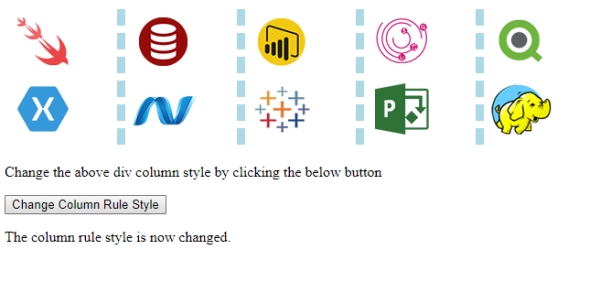
输出
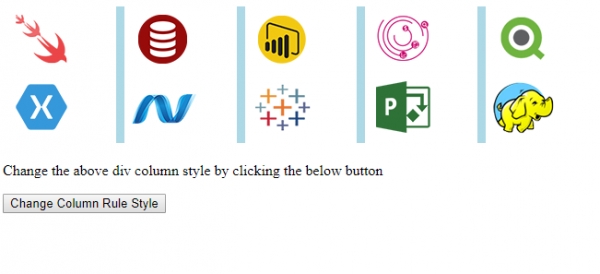
点击"更改列规则样式"按钮 −
相关文章
有用资源
html 参考教程 - 该教程包含有关 html 的更多信息:https://www.cainiaomax.com/html/

