
HTML DOM 样式的 columnGap 属性
htmlweb developmentfront end technology更新于 2024/3/13 19:24:17
HTML DOM 样式的 columnGap 属性用于指定元素列之间的间距。
以下是语法 −
设置 columnGap 属性 −
object.style.columnGap = "length|normal|initial|inherit"
以上属性解释如下 −
| 值 | 描述 |
|---|---|
| Length | 指定用于设置列间间隙的长度 |
| Normal | 这是默认值,指定列间间隙为 1em。 |
| Initial | 用于将此属性设置为初始值。 |
| Inherit | 继承父级属性值 |
让我们看一个关于 columnGap 属性的示例 −
示例
<!DOCTYPE html>
<html>
<head>
<style>
   div {
      column-count: 4;
      column-gap: 50px;
      font-size: 1.2rem;
   }
</style>
<script>
   function changeColumnGap(){
      document.getElementsByTagName("div")[0].style.columnGap="10px";
      document.getElementById("Sample").innerHTML="The column gap is now decreased";
   }
</script>
</head>
<body>
   <div>
      This is some sample text inside div. This is the second div line.This is the third div
      line.This is the fourth div line. This is the fifth div line.This is the sixth div line.
      This is the seventh div line. This is the eigtth div line.This is the ninth div line. This is
      the tenth div line.This is the eleventh div line. This is the twelth div line.This is the  thirteenth div
      line.This is the fourteen line. This is the fifteen div line.This is the sixteen div line. This  is the seventeen div line. This is the eighteen div line.
   </div>
   <p>Change the above div column gap by clicking the below button</p>
   <button onclick="changeColumnGap()">Change Column Gap</button>
   <p id="Sample"></p>
</body>
</html>
输出
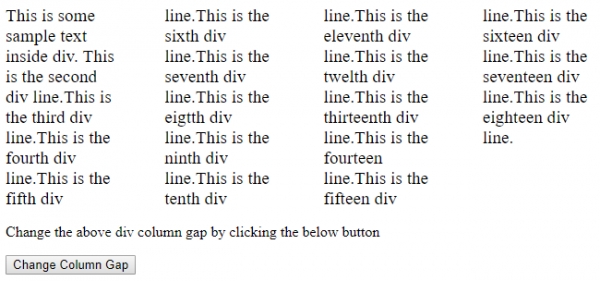
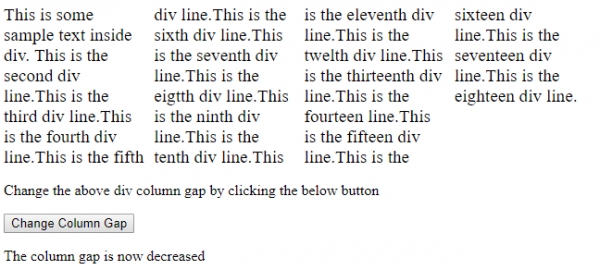
点击"更改列间距"按钮 −
相关文章
有用资源
html 参考教程 - 该教程包含有关 html 的更多信息:https://www.cainiaomax.com/html/

