
HTML DOM 样式 clear 属性
htmlweb developmentfront end technology更新于 2024/3/11 3:56:17
HTML DOM 样式 clear 属性用于获取或设置浮动元素的位置。它用于指定元素是否应移动到另一个浮动元素下方。
以下是语法 −
设置 clear 属性 −
object.style.clear='none|left|right|both|initial|inherit'
以上属性解释如下 −
| 值 | 描述 |
|---|---|
| left | 元素不浮动在左侧。 |
| right | 元素不浮动在右侧。 |
| both | 元素不浮动在左侧或右侧。 |
| none | 元素浮动在两侧,这是默认值。 |
| inherit | 继承父级属性值 |
让我们来看一个 clear 属性的示例 −
示例
<!DOCTYPE html>
<html>
<head>
<style>
   img {
      margin: 5px;
      float: right;
      clear: both;
      border: 2px solid orange;
   }
   #DIV1{
      clear:left;
   }
</style>
<script>
   function changeClear(){
      document.getElementById("DIV1").style.clear="right";
      document.getElementById("Sample").innerHTML="The div clear property is changed to right from left ";
   }
</script>
</head>
<body>
   <img src="https://www.cainiaomax.com/qlikview/images/qlikview-mini-logo.jpg">
   <div id="DIV1">This is sample text inside div. This is another line inside the div.Here is a div       containing some random english text. This div is created to demonstrate clear    property </div>
   <p>Change the above div clear property by clicking the below button</p>
   <button onclick="changeClear()">Change Clear</button>
   <p id="Sample"></p>
</body>
</html>
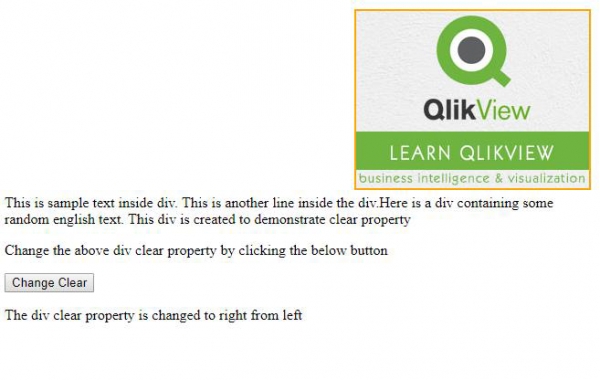
输出

点击"更改清除"按钮 −
相关文章
有用资源
html 参考教程 - 该教程包含有关 html 的更多信息:https://www.cainiaomax.com/html/

