
HTML DOM getBoundingClientRect() 方法
htmlweb developmentfront end technology更新于 2024/5/31 10:20:17
HTML DOM getBoundingClientRect() 用于返回元素相对于视口位置的大小。它返回一个 DOMRect 类型的对象,该对象具有八个属性:left、top、right、bottom、x、y、width、height。滚动位置改变时,边界矩形的位置也会随之改变。
语法
以下是 getBoundingClientRect() 方法的语法 −
element.getBoundingClientRect()
示例
让我们来看一个 getBoundingClientRect() 方法的示例 −
<!DOCTYPE html>
<html>
<head>
<script>
   function RectInfo() {
      document.getElementById("Sample").innerHTML="";
      var d = document.getElementById("DIV1");
      var Rect = d.getBoundingClientRect();
      rl = Rect.left;
      rt = Rect.top;
      rw = Rect.width;
      rh = Rect.height;
      document.getElementById("Sample").innerHTML +="Left: " + rl + ",<br> Top: " + rt + ",<br> Width: " + rw + ",<br> Height: " + rh;
   }
</script>
<style>
   #DIV1{
      width:350px;
      height:250px;
      border:2px solid blue;
      color:red;
   }
</style>
</head>
<body>
<h1>getBoundingClientRect() example</h1>
<div style="height:200px; width:300px; overflow:auto;">
<div id="DIV1">
Lorem ipsum dolor sit amet, consectetur adipiscing elit, sed do eiusmod tempor incididunt ut labore et dolore magna aliqua.
Ut enim ad minim veniam, quis nostrud exercitation ullamco laboris nisi ut aliquip ex ea commodo consequat.
</div>
</div>
<br>
<button onclick="RectInfo()">GET INFO</button>
<p id="Sample"></p>
</body>
</html>
输出
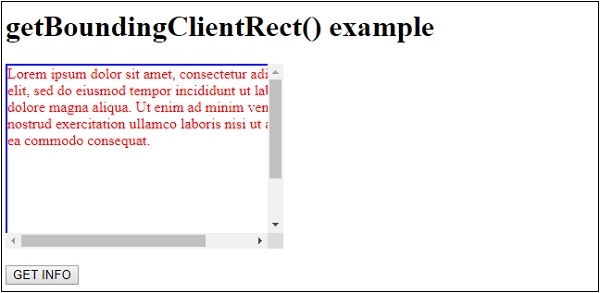
这将产生以下输出 −
点击"获取信息"按钮 −
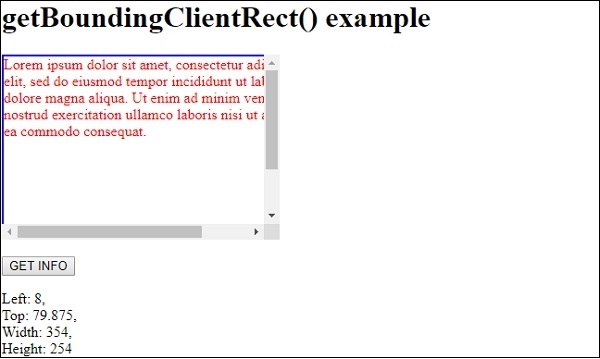
在上面的例子中 −
我们首先创建了一个高度和宽度分别为 200px 和 300px 的 div。它的 overflow 属性设置为 auto,即如果内容溢出 div,滚动条将自动添加。它包含另一个 id 为"DIV1"的 div,并应用了一些样式。
#DIV1{
   width:350px;
   height:250px;
   border:2px solid blue;
   color:red;
}
<div style="height:200px; width:300px; overflow:auto;">
<div id="DIV1">
Lorem ipsum dolor sit amet, consectetur adipiscing elit, sed do eiusmod tempor incididunt ut
labore et dolore magna aliqua. Ut enim ad minim veniam, quis nostrud exercitation ullamco
laboris nisi ut aliquip ex ea commodo consequat.
</div>
</div>
然后,我们创建了一个按钮"GET INFO",当用户点击该按钮时,它将执行 RectInfo() 方法 −
<button onclick="RectInfo()">GET INFO</button>
RectInfo() 方法使用 getElementById() 方法获取 <div> 元素,并将其赋值给变量 d。然后,它对变量 d 调用 getBoundingClientRect() 方法,返回一个包含 div 元素信息的 DOMRect 对象。返回的对象被赋值给变量 Rect。
然后,我们使用 DOMRect 对象的 left、top、width 和 height 属性来显示其相对于视口的位置和大小。此信息通过其 innerHTML 属性显示在 id 为"Sample"的段落中。−
function RectInfo() {
   document.getElementById("Sample").innerHTML="";
   var d = document.getElementById("DIV1");
   var Rect = d.getBoundingClientRect();
   rl = Rect.left;
   rt = Rect.top;
   rw = Rect.width;
   rh = Rect.height;
   document.getElementById("Sample").innerHTML +="Left: " + rl + ",<br> Top: " + rt + ",<br> Width: " + rw + ",<br> Height: " + rh;
}
相关文章
有用资源
html 参考教程 - 该教程包含有关 html 的更多信息:https://www.cainiaomax.com/html/

