
HTML DOM execCommand() 方法
htmlweb developmentfront end technology更新于 2024/5/29 10:52:17
HTML DOM execCommand() 方法用于执行用户所选可编辑部分上指定的命令。首先,应设置 document.design 属性以使其具有可编辑部分。
语法
以下是 execCommand() 方法的语法 −
document.execCommand(command, showUI, value)
其中,value 表示需要完成的一些特定命令,例如 fontSize、forecolor 等。showUI 是一个布尔值,用于指定是否显示该值。命令名称是需要在可编辑部分上执行的命令。
以下是命令参数的值 −
"backColor", "bold", "createLink", "copy", "cut", "defaultParagraphSeparator", "delete",
"fontName", "fontSize", "foreColor", "formatBlock", "forwardDelete", "insertHorizontalRule",
"insertHTML", "insertImage", "insertLineBreak", "insertOrderedList", "insertParagraph",
"insertText", "insertUnorderedList", "justifyCenter", "justifyFull", "justifyLeft",
"justifyRight", "outdent", "paste", "redo", "selectAll", "strikethrough", "styleWithCss",
"superscript", "undo", "unlink", "useCSS"
示例
让我们看一个 execCommand() 方法的示例 −
<!DOCTYPE html>
<html>
<body ondblclick="changeText()">
<h1>execCommand() method example</h1>
<h3>double click on any text to change its fontsize and color</h3>
<p>Here is some text for being clicked upon. Some sample text is here too </p>
<script>
   document.designMode = "on";
   function changeText() {
      document.execCommand("fontSize",true,"20px");
      document.execCommand("backColor",true,"lightgreen");
      document.execCommand("foreColor",true,"blue");
}
</script>
</body>
</html>
输出
这将产生以下输出 −
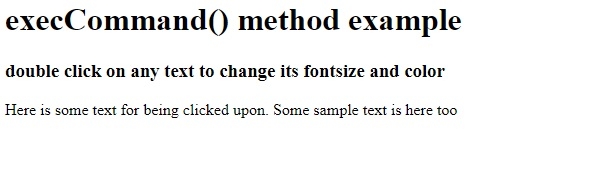
双击页面上的某些文本时,该文本的格式将发生改变 −
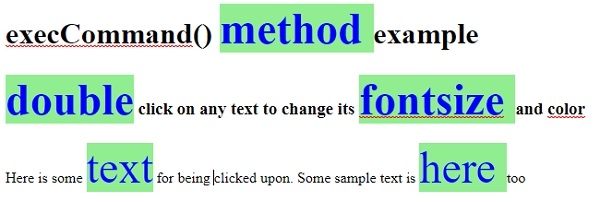
在上面的例子中 −
我们首先将一个事件处理程序与文档主体关联起来,用于双击事件。双击任何主体子元素时,它将执行 changeText() 方法。此处的主体子元素是 h1、h3 和 p 元素 −
<body ondblclick="changeText()">
我们首先将文档设计模式设置为开启,以便可以编辑文档。changeText() 函数执行文档的 execCommand() 方法,并传递其参数(例如 fontSize、backColor、foreColor)及其相应的值。这些值将应用于用户双击的可编辑部分 −
Function changeText() {
document.execCommand("fontSize",true,"20px");
document.execCommand("backColor",true,"lightgreen");
document.execCommand("foreColor",true,"blue");
相关文章
有用资源
html 参考教程 - 该教程包含有关 html 的更多信息:https://www.cainiaomax.com/html/

