
HTML DOM del dateTime 属性
htmlweb developmentfront end technology更新于 2024/5/20 10:20:17
HTML DOM del dateTime 属性与 HTML <del> 元素关联,用于告知用户网站上某些文本何时被删除。它显示了文本被删除的日期和时间。
语法
以下是语法 −
设置 dateTime 属性 −
delObject.dateTime = YYYY -MM-DDThh:mm:ssTZD
其中,YYYY=年,MM=月,DD=日,T=分隔符或空格,hh=小时,mm=分钟,ss=秒,TZD=时区指示符
示例
让我们看一个 del dateTime 属性的示例 −
<!DOCTYPE html>
<html>
<head>
<title>del dateTime property example</title>
<style>
   #Sample{color:blue};
</style>
</head>
<body>
<h2>del dateTime property example</h2>
<p><del id="Del1" datetime="2019-02-22T05:10:22Z">Some text has been deleted</del></p>
<p>Click the below button to change the datetime attribute value of the deleted text above</p>
<button onclick="changeDate()">CHANGE</button>
<p id="Sample"></p>
<script>
   function changeDate() {
      document.getElementById("Del1").dateTime = "2019-06-27T10:20:02Z";
      document.getElementById("Sample").innerHTML = "The datetime attribute attribute was changed to '2019-06-27T10:20:02Z'.";
   }
</script>
</body>
</html>
输出
这将产生以下输出 −
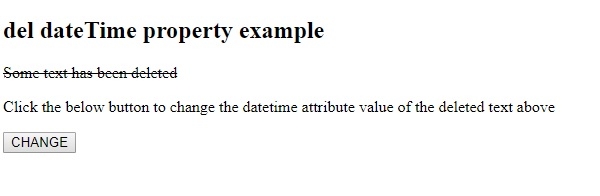
点击"更改"按钮 −
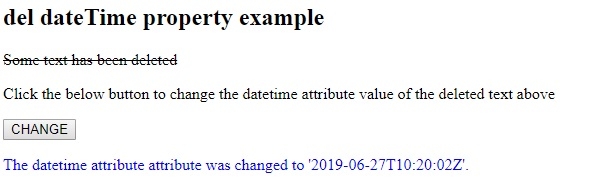
在上面的例子中 −
我们首先在 <p> 元素内创建了一个 <del> 元素,其 id 为 “Del1”,datetime 属性值为 “2019-02-22T05:10:22Z”。
<p><del id="Del1" datetime="2019-02-22T05:10:22Z">部分文本已被删除</del></p>
然后,我们创建了按钮 CHANGE,当用户点击按钮 − 时,该按钮将执行 changeDate() 方法。
<button onclick="changeDate()">CHANGE</button>
changeDate() 方法获取 <del> 元素,并将其 dateTime 属性值设置为 “2019-06-27T10:20:02Z”。然后,我们在 id 为 “Sample” 的段落中显示此更改,并将其 innerHTML 属性设置为我们想要显示的文本。段落"Sample"内的文本显示为蓝色,因为它应用了与其 id 对应的样式 −
function changeDate() {
   document.getElementById("Del1").dateTime = "2019-06-27T10:20:02Z";
   document.getElementById("Sample").innerHTML = "The datetime attribute attribute was changed to '2019-06-27T10:20:02Z'.";
}
相关文章
有用资源
html 参考教程 - 该教程包含有关 html 的更多信息:https://www.cainiaomax.com/html/

