
如何在 Java 中限制 JPasswordField 中的数字位数?\
javaobject oriented programmingprogramming更新于 2025/6/20 3:24:17
JPasswordField 是 JTextField 的子类,JPasswordField 中输入的每个字符都可以用 echo 字符替换。这允许机密输入密码。JPasswordField 的重要方法是 getPassword()、getText()、getAccessibleContext() 等。默认情况下,我们可以在 JPasswordField 中输入任意数量的数字。如果我们想通过实现 DocumentFilter 类 来限制用户输入的数字,则需要重写 replace() 方法。
语法
public void replace(DocumentFilter.FilterBypass fb, int offset, int length, String text, AttributeSet attrs) throws BadLocationException
示例
import java.awt.*;
import java.awt.*;
import javax.swing.*;
import javax.swing.text.*;
public class JPasswordFieldDigitLimitTest extends JFrame {
   private JPasswordField passwordField;
   private JPanel panel;
   public JPasswordFieldDigitLimitTest() {
      panel = new JPanel();
      ((FlowLayout) panel.getLayout()).setHgap(2);
      panel.add(new JLabel("Enter Pin: "));
      passwordField = new JPasswordField(4);
      PlainDocument document = (PlainDocument) passwordField.getDocument();
      document.setDocumentFilter(new DocumentFilter() {
         @Override
         public void replace(DocumentFilter.FilterBypass fb, int offset, int length, String text, AttributeSet attrs) throws BadLocationException {
            String string = fb.getDocument().getText(0, fb.getDocument().getLength()) + text;
               if (string.length() <= 4) {
                  super.replace(fb, offset, length, text, attrs);
               }
         }
      });
      panel.add(passwordField);
      add(panel);
      setSize(400, 300);
      setDefaultCloseOperation(EXIT_ON_CLOSE);
      setLocationRelativeTo(null);
      setVisible(true);
   }
   public static void main(String[] args) {
      new JPasswordFieldDigitLimitTest();
   }
}
输出
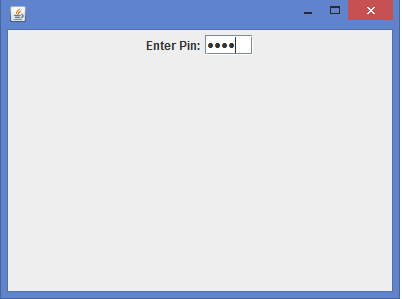
相关文章
有用资源
java 参考教程 - 该教程包含有关 java 的更多信息:https://www.cainiaomax.com/java/

