
HTML 中 :focus 和 :active 选择器的区别
htmlweb developmentfront end technology更新于 2024/1/30 13:00:17
:focus
:focus 选择器用于在表单元素(例如按钮、链接、输入框)获得焦点时应用所需的样式。元素可以通过鼠标或 Tab 键获取焦点。焦点会一直保留在该元素上,直到其他元素获得焦点。
:active
:active 选择器用于指示锚标签或按钮处于活动状态。当鼠标按下时,active 选择器将生效,并保持生效状态,直到鼠标按下。
示例
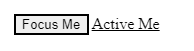
以下示例展示了 :focus 和 :active 选择器在按钮和链接上的用法。
<!DOCTYPE html>
<html>
<head>
   <title>Selector Example</title>
   <style>
      button {
         border: 2px solid black;
      }
      button:focus {
         border: 2px dotted red;
      }
      a {
         color: black;
      }
      a:active {
         color: red;
      }
   </style>
</head>
<body>
   <button type="submit">Focus Me</button>
   <a href="#">Active Me</a>
</body>
</html>
输出
相关文章
有用资源
html 参考教程 - 该教程包含有关 html 的更多信息:https://www.cainiaomax.com/html/

