
使用 Java 逐行比较两个不同的文件
在本文中,我们将比较系统中保存的两个不同的文本文件。我们将逐行检查每个文本文件,通过比较这些文本文件,我们可以找出相似之处和不同之处。
让我们看看如何使用 Java 编程语言来实现这一点。
向您展示一些实例
实例 1
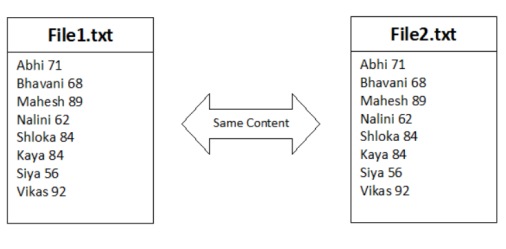
下图描绘了两个内容相同的不同文本文件,因此输出将是两个内容相同的文件。
实例 2
下面代表两个文件,即 file1.txt 和 file2.txt 及其内容。
file1.txt
This is amazing.
Java Language.
file2.txt
This is amazing.
Python Language.
在这里,我们可以注意到两个文件在第 2 行的内容不同。因为 file1,第 2 行包含"Java 语言",而 file2,第 2 行包含"Python 语言"
算法
步骤 1 - 创建 reader1 和 reader2 作为两个 BufferedReader 对象,并使用它们逐行读取两个输入文本文件。
步骤 2 - 创建两个变量。首先,创建一个名为"areEqual"的布尔变量并将其初始化为 true。其次,创建一个名为"lineNum"的 int 变量并将其初始化为 1。areEqual 是一个标志变量,最初设置为 true,当输入文件的内容不同时,该变量将更改为 false。行数将保存在 lineNum 中。
步骤 3 - 将文件 1 的内容读入第 1 行,将文件 2 的内容读入第 2 行。
步骤 4 - 继续将文件 file1 和 file2 中的行分别读入 line1 和 line2,直到两个文件都已读完。如果 line1 或 line2 为空,则将"areEqual"设置为 false。
步骤 5 - 如果 areEqual 为 true,则声明两个文件的内容相同。如果 'areEqual' 的值为 false,则声明文件的内容不同。
步骤 6 - 关闭资源。
多种方法
我们提供了不同方法的解决方案。
通过使用 BufferedReader 类
通过使用内存映射文件
让我们逐一查看程序及其输出。
方法 1:通过使用 BufferedReader 类
示例
在此方法中,您将创建 BufferedReader 类的对象,并使用内置的 readLine() 方法读取两个文件的内容并进行比较。
import java.io.BufferedReader;
import java.io.FileReader;
import java.io.IOException;
public class Main{
   public static void main(String[] args) throws IOException{

   BufferedReader reader1 = new BufferedReader(new FileReader("E:\file1.txt"));
   BufferedReader reader2 = new BufferedReader(new FileReader("E:\file2.txt"));
      String line1 = reader1.readLine();
      String line2 = reader2.readLine();
      int lineNum = 1;
      boolean areEqual = true;
      while (line1 != null || line2 != null){
         if(line1 == null || line2 == null){
            areEqual = false;
            break;
         } else if(! line1.equalsIgnoreCase(line2)) {
            areEqual = false;
            break;
         }
         line1 = reader1.readLine();
         line2 = reader2.readLine();
         lineNum++;
      }
      if(areEqual){
         System.out.println("Both the files have same content");
      } else {
         System.out.println("Both the files have different content");
         System.out.println("In both files, there is a difference at line number: "+lineNum);
         System.out.println("One file has "+line1+" and another file has "+line2+" at line "+lineNum);
      }
      reader1.close();
      reader2.close();
   }
}
输出
Both the files have different content
In both files, there is a difference at line number: 2
One file has Java Language. and another file has Python Language. at line 2
注意 - 此处的输入场景类似于上面解释的实例 2。
方法 2:通过使用内存映射文件
示例
在此方法中,我们将利用内存映射文件概念,这是一个内核对象,它将字节从磁盘文件映射到系统的内存地址,通过操作内存映射文件的内容,我们可以知道内容是相同还是不同。
import java.io.File;
import java.nio.file.Path;
import java.nio.file.Paths;
import java.io.IOException;
import java.io.RandomAccessFile;
import java.nio.MappedByteBuffer;
import java.nio.channels.FileChannel;
public class Main {
   public static void main(String[] args) {
      Path path1 = Paths.get("E://file1.txt");
      Path path2 = Paths.get("E://file2.txt");
      compare(path1,path2);
   }
   public static void compare(Path path1, Path path2) {
      try {
         RandomAccessFile randomAccessFile1 = new RandomAccessFile(path1.toFile(), "r");
         RandomAccessFile randomAccessFile2 = new RandomAccessFile(path2.toFile(), "r");
         FileChannel ch1 = randomAccessFile1.getChannel();
         FileChannel ch2 = randomAccessFile2.getChannel();
         if (ch1.size() != ch2.size()) {
            System.out.println("Both files have different content");
         }
         long size = ch1.size();
         MappedByteBuffer m1 = ch1.map(FileChannel.MapMode.READ_ONLY, 0L, size);
         MappedByteBuffer m2 = ch2.map(FileChannel.MapMode.READ_ONLY, 0L, size);
         if (m1.equals(m2)) {
            System.out.println("Both files have same content");
         }
      }
      catch(Exception e){
         System.out.println(e);
      }
   }
}
输出
Both files have same content
注意 - 这里我们考虑的两个文件都具有相同的内容。
在本文中,我们探讨了如何在 Java 中逐行比较两个不同文本文件的内容。
相关文章
有用资源
java 参考教程 - 该教程包含有关 java 的更多信息:https://www.cainiaomax.com/java/

