
用 Java 构建计算表达式游戏
任务是构建一个显示表达式并提示答案的应用程序。输入解决方案后,将显示一个新的表达式,并且这些表达式会不断变化。经过一段时间后,将评估针对相应应用程序给出的解决方案,并显示准确答案的总数。
游戏中的方法(用户定义)
本节将引导您了解实现中的方法(和构造函数)及其在"计算表达式游戏"中的作用。
CalculateExpressionGame()
这是 calculateExpressionGame 类的构造函数。它通过创建和配置 Swing 组件(如 JLabel、JTextField、JButton 和 JLabel)来设置游戏窗口,以显示表达式和结果。它还为提交按钮设置了动作监听器。
public CalculateExpressionGame() {
    super("Calculate Expression Game");
    setDefaultCloseOperation(JFrame.EXIT_ON_CLOSE);
    setLayout(new FlowLayout());

    // 创建并配置 Swing 组件
    expressionLabel = new JLabel();
    expressionLabel.setFont(new Font("Arial", Font.BOLD, 18));
    add(expressionLabel);

    answerTextField = new JTextField(10);
    add(answerTextField);

    submitButton = new JButton("Submit");
    add(submitButton);

    resultLabel = new JLabel();
    resultLabel.setFont(new Font("Arial", Font.BOLD, 18));
    add(resultLabel);

    // 向提交按钮添加一个 ActionListener
   submitButton.addActionListener(new ActionListener() {
      @Override
      public void actionPerformed(ActionEvent e) {
         checkAnswer();
      }
   });

   pack();
   setLocationRelativeTo(null);
   setVisible(true);
}
startGame(int timeLimit) 此方法通过初始化游戏变量(例如 totalTime、numQuestions 和 numCorrect)来启动游戏。它调用 generateQuestion() 方法来显示第一个算术表达式。它还创建并启动一个计时器来跟踪剩余时间。如果时间用完,则调用 endGame() 方法。
public void startGame(int timeLimit) {
   totalTime = timeLimit;
   numQuestions = 0;
   numCorrect = 0;
   generateQuestion();

   // 创建并启动一个计时器来跟踪剩余时间
   timer = new Timer(1000, new ActionListener() {
   @Override
   public void actionPerformed(ActionEvent e) {
      totalTime--;
      if (totalTime >= 0) {
         setTitle("Calculate Expression Game - Time: " + totalTime);
      } else {
         endGame();
      }
   }
   });
   timer.start();
}
generateQuestion() 此方法通过生成随机数和运算符来生成随机算术表达式。它更新 expressionLabel 以显示生成的表达式,并清除 answerTextField 以供用户输入。它还会增加 numQuestions 计数器。
private void generateQuestion() {
    // 为表达式生成随机数和运算符
    int num1 = (int) (Math.random() * 10) + 1;
    int num2 = (int) (Math.random() * 10) + 1;
    int operatorIndex = (int) (Math.random() * 3);
    String operator = "";
    int result = 0;

    // 根据随机生成的索引确定运算符
   switch (operatorIndex) {
      case 0:
         operator = "+";
         result = num1 + num2;
         break;
      case 1:
         operator = "-";
		 result = num1 - num2;
		 break;
      case 2:
         operator = "*";
         result = num1 * num2;
         break;
}
checkAnswer() 当用户点击提交按钮时,会调用此方法。它通过解析 answerTextField 中的整数值来检查用户的答案。然后,它通过调用 evolveExpression() 方法评估 expressionLabel 中显示的表达式。如果用户的答案与评估结果匹配,则它会增加 numCorrect 计数器。之后,它调用 generateQuestion() 来生成新问题。
private void checkAnswer() {
   try {
        // 从文本字段解析用户的答案
        int userAnswer = Integer.parseInt(answerTextField.getText());
        int result = assessExpression(expressionLabel.getText());

        // 检查用户的答案是否正确并更新计数
      	if (userAnswer == result) {
         numCorrect++;
      }
   } catch (NumberFormatException e) {
      // 答案格式无效
   }
   // 生成新问题
   generateQuestion();
}
evaluateExpression(String expression) 此方法将算术表达式作为字符串参数并对其进行求值以获得结果。它使用空格作为分隔符将表达式拆分为其组成部分(num1、operator、num2)。它将 num1 和 num2 转换为整数并应用运算符执行算术运算。返回结果值。
private int assessExpression(String expression) {
    // 将表达式拆分为部分:num1、operator、num2
    String[] parts = expression.split(" ");
    int num1 = Integer.parseInt(parts[0]);
    String operator = parts[1];
    int num2 = Integer.parseInt(parts[2]);

    int result = 0;
    // 根据运算符求值表达式
   switch (operator) {
      case "+":
         result = num1 + num2;
         break;
      case "-":
         result = num1 - num2;
         break;
      case "*":
         result = num1 * num2;
         break;
   }
   return result;
}
endGame() 达到时间限制时调用此方法。它停止计时器并禁用提交按钮。它通过将 numCorrect 除以 numQuestions 并乘以 100 来计算准确率。最终结果显示在 resultLabel 中,其中包含有关问题总数、正确答案数量和准确率百分比的信息。
private void endGame() {
    // 停止计时器并禁用提交按钮
    timer.stop();
    setTitle("计算表达式游戏 - 时间到了!");
    submitButton.setEnabled(false);

    // 计算准确率并显示最终结果
   double accuracy = (double) numCorrect / numQuestions * 100;
   resultLabel.setText("Game Over! Total Questions: " + numQuestions + " | Correct Answers: " + numCorrect + " | Accuracy: " + accuracy + "%");
}
main(String[] args) 这是程序的入口点。它创建 CalculateExpressionGame 类的实例,设置游戏的时间限制(以秒为单位),并通过调用 startGame() 启动游戏。游戏在事件调度线程 (EDT) 上执行,以确保正确的 Swing UI 处理。
public static void main(String[] args) {
   SwingUtilities.invokeLater(new Runnable() {
      @Override
      public void run() {
         CalculateExpressionGame game = new CalculateExpressionGame();
         game.startGame(60); // 60 seconds time limit
      }
   });
}
完整示例
以下是此游戏的完整实现 –
import javax.swing.*;
import java.awt.*;
import java.awt.event.ActionEvent;
import java.awt.event.ActionListener;

public class CalculateExpressionGame extends JFrame {
    private JLabel expressionLabel;
    private JTextField answerTextField;
    private JButton submitButton;
    private JLabel resultLabel;
    private Timer timer;
    private int totalTime;
    private int numQuestions;
    private int numCorrect;

    public CalculateExpressionGame() {
        super("Calculate Expression Game");
        setDefaultCloseOperation(JFrame.EXIT_ON_CLOSE);
        setLayout(new FlowLayout());

        // 创建并配置 Swing 组件
        expressionLabel = new JLabel();
        expressionLabel.setFont(new Font("Arial", Font.BOLD, 18));
        add(expressionLabel);

        answerTextField = new JTextField(10);
        add(answerTextField);
        submitButton = new JButton("Submit");
        add(submitButton);
        resultLabel = new JLabel();
        resultLabel.setFont(new Font("Arial", Font.BOLD, 18));
        add(resultLabel);

        // 向提交按钮添加 ActionListener
        submitButton.addActionListener(new ActionListener() {
            @Override
            public void actionPerformed(ActionEvent e) {
                checkAnswer();
            }
        });

        pack();
        setLocationRelativeTo(null);
        setVisible(true);
    }

    public void startGame(int timeLimit) {
        totalTime = timeLimit;
        numQuestions = 0;
        numCorrect = 0;

        generateQuestion();

        // 创建并启动一个计时器来跟踪剩余时间
        timer = new Timer(1000, new ActionListener() {
            @Override
            public void actionPerformed(ActionEvent e) {
                totalTime--;
                if (totalTime >= 0) {
                    setTitle("Calculate Expression Game - Time: " + totalTime);
                } else {
                    endGame();
                }
            }
        });
        timer.start();
    }

    private void generateQuestion() {
        // 为表达式生成随机数和运算符
        int num1 = (int) (Math.random() * 10) + 1;
        int num2 = (int) (Math.random() * 10) + 1;
        int operatorIndex = (int) (Math.random() * 3);
        String operator = "";
        int result = 0;

        // 根据随机生成的索引确定运算符
        switch (operatorIndex) {
            case 0:
                operator = "+";
                result = num1 + num2;
                break;
            case 1:
                operator = "-";
                result = num1 - num2;
                break;
            case 2:
                operator = "*";
                result = num1 * num2;
                break;
        }

        // 更新表达式标签并清除答案文本字段
        expressionLabel.setText(num1 + " " + operator + " " + num2 + " = ");
        answerTextField.setText("");
        answerTextField.requestFocus();

        numQuestions++;
    }

    private void checkAnswer() {
        try {
            // 从文本字段解析用户的答案
            int userAnswer = Integer.parseInt(answerTextField.getText());
            int result = assessExpression(expressionLabel.getText());

            // 检查用户的答案是否正确并更新计数
            if (userAnswer == result) {
                numCorrect++;
            }
        } catch (NumberFormatException e) {
            // 答案格式无效
        }

        // 生成新问题
        generateQuestion();
    }

    private int evaluateExpression(String expression) {
        // 将表达式拆分为几个部分:num1、operator、num2
        String[] parts = expression.split(" ");
        int num1 = Integer.parseInt(parts[0]);
        String operator = parts[1];
        int num2 = Integer.parseInt(parts[2]);

        int result = 0;
        // 根据运算符评估表达式
        switch (operator) {
            case "+":
                result = num1 + num2;
                break;
            case "-":
                result = num1 - num2;
                break;
            case "*":
                result = num1 * num2;
                break;
        }

        return result;
    }

    private void endGame() {
        // 停止计时器并禁用提交按钮
        timer.stop();
        setTitle("Calculate Expression Game - Time's up!");
        submitButton.setEnabled(false);

        // 计算准确率并显示最终结果
        double accuracy = (double) numCorrect / numQuestions * 100;
        resultLabel.setText("Game Over! Total Questions: " + numQuestions + " | Correct Answers: " + numCorrect
                + " | Accuracy: " + accuracy + "%");
    }

    public static void main(String[] args) {
        SwingUtilities.invokeLater(new Runnable() {
            @Override
            public void run() {
                CalculateExpressionGame game = new CalculateExpressionGame();
                game.startGame(60); // 60 seconds time limit
            }
        });
    }
}
输出
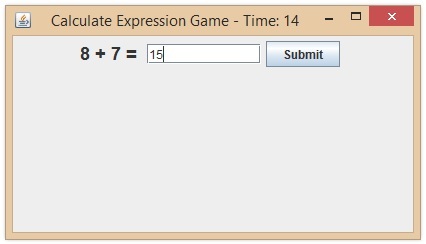
该程序使用 Java Swing 元素构建了一个简单的游戏窗口。它创建任意数学公式(+、- 和 *),并提示用户在规定的时间内(在本例中为 60 秒)提供正确的答案。
用户可以提交答案,游戏将记录算术问题的数量、正确答案的数量和准确率。游戏将在规定的时间过后显示结果。
要测试此代码的功能,请在 Eclipse 或 IntelliJ IDEA 等 Java 开发环境中运行它。
相关文章
有用资源
java 参考教程 - 该教程包含有关 java 的更多信息:https://www.cainiaomax.com/java/

